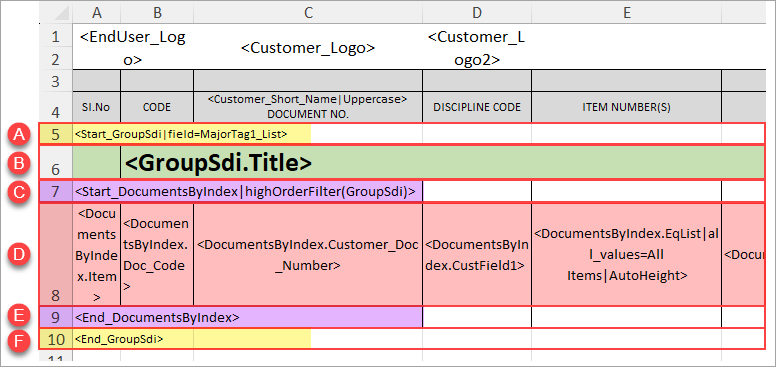
Cards included in an SDI report can easily be grouped by a specified value (either by Major Tag OR by a custom doc code/card field). To achieve this , the "GroupSDI" array can be added to the template (encompassing the "DocumentsByIndex" array).
With the Group SDI array added, the "highOrderFilter(GroupSDI)" parameter should be added to the <Start_DocumentsByIndex> array starter (e.g., <Start_DocumentsByIndex|highOrderFilter(GroupSdi)>)
The order of the variables is as follows:
- <Start_GroupSdi|field=X>
- "X" to be replaced with either "MajorTag1_List" OR "CustFieldX".
- If grouping by a custom doc code/card field, see instructions for identifying the custom field ID number: Custom Field ID Number Identification.
- Note: Table headers can either come before this array starter (to display headers at the top of the report only) OR can be included within the array (to display headers at the top of each individual grouping)
- "X" to be replaced with either "MajorTag1_List" OR "CustFieldX".
- <GroupSdi.Title>
- <Start_DocumentsByIndex|highOrderFilter(GroupSdi)>
- <DocumentsByIndex> variables
- <End_DocumentsByIndex>
- <End_GroupSdi>
Once the SDI is generated, the groups will be order alphabetically.
If grouping by major tag - Cards that are associated with all possible groupings will be added to a "Standard Documents" grouping. However, if there are cards associated with more than one grouping (but not all), they will be added under a separate grouping for that unique set of values.
Example: There are 3 major tags - A, B and C.
- Cards associated with all 3 major tags will be added to the "Standard Documents" grouping
- Cards associated with 2 of the 3 major tags will be added to their own specific grouping (e.g., "MT 1 & 2," "MT 2 & 3", or "MT 1 & 3")